Attributing emotes
Attributing images to their creator spreads awareness, plus we get to see an ever-growing list of people using our emotes, which is awesome. Select the option below that applies to you!
I want to attribute a new emote
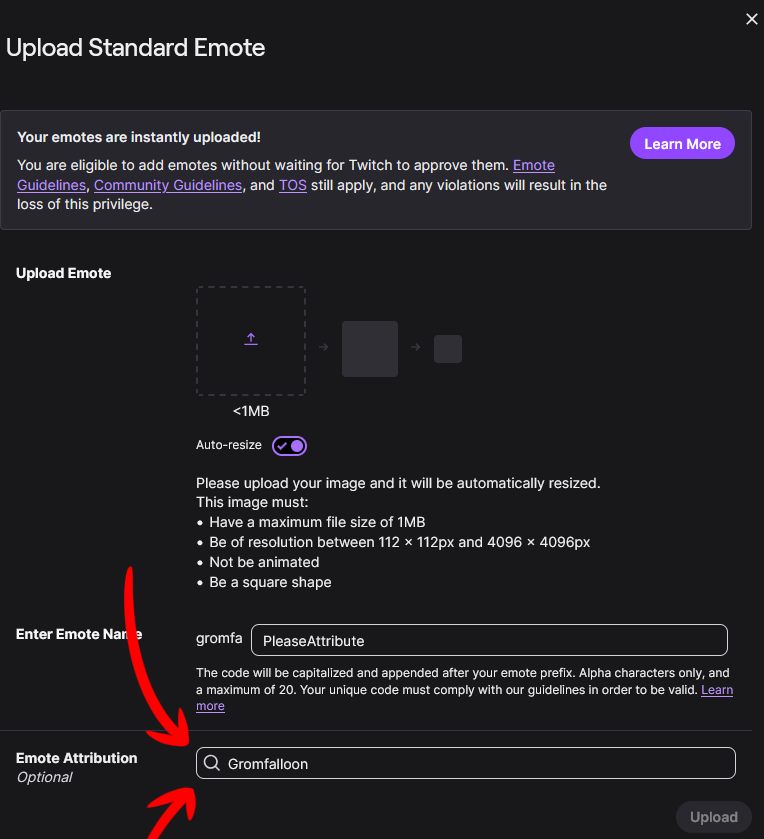
- Go to Viewer Rewards > Emotes in your dashboard on Twitch.
- In the top-right corner, select Upload New.
- Upload the image and give it a name.
- At the very bottom of the page, you'll find Emote Attribution. You may have to scroll down to see it.
- Please enter "Gromfalloon" as the artist.
I want to attribute an existing emote
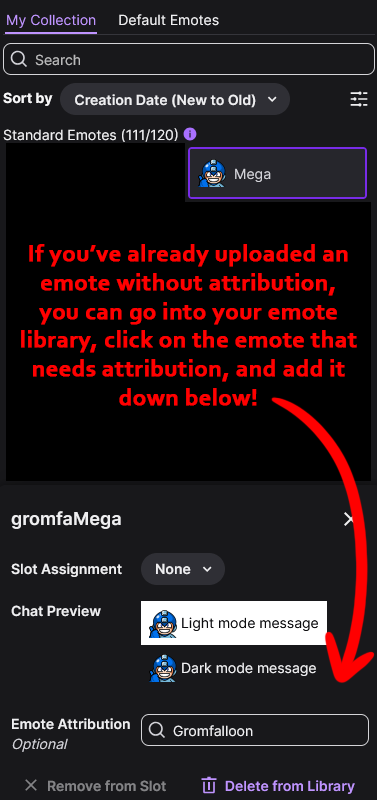
- Go to Viewer Rewards > Emotes in your dashboard on Twitch.
- Select the emote you wish to attribute on the right side of the screen.
- In the bottom-right corner, you'll find Emote Attribution.
- Please enter "Gromfalloon" as the artist.
Thank you, this helps me a lot!